deviant art

Deviant Login Shop  Join deviantART for FREE Take the Tour
[x]
Shop Similar Prints
This Print Not Available
Download File
ZIP, 2.1 MB
more ▶

More from ~kediashubham

Featured in Groups:

Details

February 22, 2009
2.1 MB
Link
Thumb

Statistics

Comments: 74
Favourites: 556 [who?]

Views: 176,793 (35 today)
Downloads: 44,592 (3 today)
[x]
:iconkediashubham:
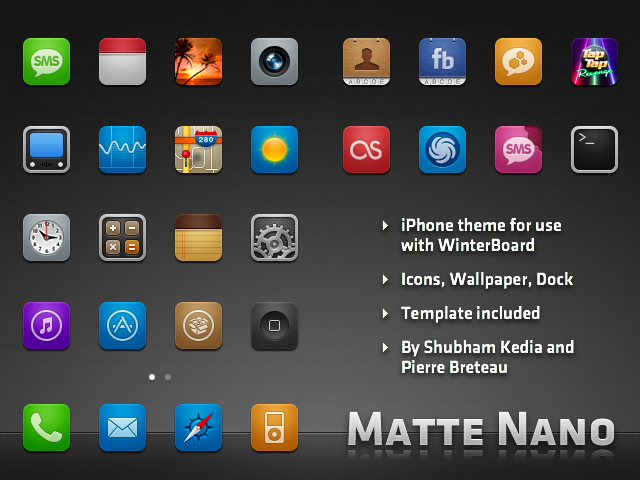
Matte Nano theme for iPhone
by Shubham Kedia and Pierre Breteau

An iPhone theme I made to complement the Matte UI that I had released earlier.

Contains icons, wallpaper, dock, and a template to make your own icons.

I only made the main homescreen icons and the icons in the Settings.app, all other icons were made by Pierre (applefish). All credit goes to him.

Place in /Library/Themes and apply using WinterBoard. Enjoy!
Add a Comment:
 
love 3 3 joy 1 1 wow 0 0 mad 0 0 sad 2 2 fear 0 0 neutral 0 0
:iconeliawk:
i'm on iphone 3g - os 4.2.1 and the theme will not applied to applications like calendar, clock, messages, phone, camera..
what can i do?
thanks
Reply
:iconyeahsus:
Awesome theme, BUT (!): I got a black, transparent Border around the Icons in my Dock, how can i remove this border?
Reply
:iconchikenart:
i love the colors used man and never get tired of looking at the texture on the facebook icon its awesome!!
Reply
:icondixiecup101:
~dixiecup101 Jun 11, 2011  Hobbyist Digital Artist
The theme looks great, however the dock seems to be too far down or something. here is a screen shot:

[link]

If that doesn't work, try this link:

[link]

______________________________________________________________________________________________________

The icons are half off the screen. Any help would be greatly appreciated
Reply
:iconcinderstaroficetribe:
~CinderstarofIceTribe Apr 20, 2011   Digital Artist
How do I install this onto my iPhone? I have a 3G with 4.2.1
Reply
:iconigaret:
Hello, could you please post your theme over at [link] in the "Themes" category? Thanks a ton!
Reply
:icongolebara:
~golebara Feb 7, 2011  Hobbyist Photographer
This is awesome except that when you go into a folder (grouped apps), the wallpaper changes to the default user wallpaper.

Any idea?
Reply
:iconjacmrtinez:
find the theme wallpaper save into your photos and set that as your wallpaper. If you have a different wallpaper set the folder will open to that wallpaper
Reply
:icongolebara:
~golebara Jul 29, 2011  Hobbyist Photographer
It's a pity I no longer use the iPhone.
Reply
Add a Comment: